Remote Access
Cardiff & South Wales IT Specialists
Remote IT Support
Download the tool below to start a remote support session with our team.
Reach out now
0333 014 4544
When requested, please click one of the software downloads below.
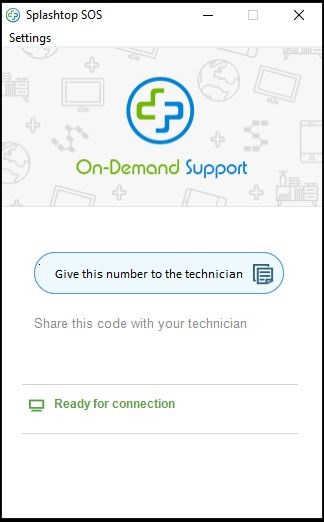
If you are using Chrome, there will be a download in the bottom left-hand corner of your screen which you'll need to click, "splashtop-ccsw.exe". Click this and a window will appear with a 9 digit code. Please provide this to your IT technician.
You will be presented with a box similar to the one below. Please provide the technician with the number.
Having trouble? Call us on 0333 014 4544 and we'll talk you through it.